Download your FREE 14 day software trial now! Get a taste of what we offer, and see if it is right for you.
http://www.helpkidzlearn.com/eyegaze-downloads?aref=EOMPODIN
Showing posts with label help. Show all posts
Monday, 18 May 2015
Friday, 15 May 2015
ChooseIt! Maker 3 - EyeGaze
Award winning CM3 teams up with myGaze Assistive, the world’s first affordable, easy to use eye tracker to provide a great resource for eye gaze students wanting;
• To develop targeting and dwell select skills
• To develop choice making skills
• Customisable content to meet specific needs and interests.
Your myGaze Assistive system can also be used with lots of other eye gaze software titles PLUS standard Windows software you would normally access with a mouse. You can use myGaze to move the mouse cursor around the screen with your eyes, dwell, blink or press a switch to select an area on screen, with single and double click functions. You can also select and drag the mouse cursor and easily access menus and configurations with on or off screen access buttons. With extensive calibration and interaction settings to meet the majority of users’ needs and a user friendly interface make this a popular option.
http://www.helpkidzlearn.com/shop/eye-gaze/chooseit-maker-3-eyegaze?aref=BTNDIJNT?aref=MKCJBFIR
• To develop targeting and dwell select skills
• To develop choice making skills
• Customisable content to meet specific needs and interests.
Your myGaze Assistive system can also be used with lots of other eye gaze software titles PLUS standard Windows software you would normally access with a mouse. You can use myGaze to move the mouse cursor around the screen with your eyes, dwell, blink or press a switch to select an area on screen, with single and double click functions. You can also select and drag the mouse cursor and easily access menus and configurations with on or off screen access buttons. With extensive calibration and interaction settings to meet the majority of users’ needs and a user friendly interface make this a popular option.
http://www.helpkidzlearn.com/shop/eye-gaze/chooseit-maker-3-eyegaze?aref=BTNDIJNT?aref=MKCJBFIR
Counting Songs Bundle
The Counting Songs bundle brings together two of our popular Inclusive Apps. Counting Songs 1 is principally aimed at young children beginning to count to 5 and Counting Songs 2 has been aimed at older children who may still be working towards developing their counting skills from 1 to 5 but may prefer content more appropriate to their age. There is however plenty of fun for both groups in each App giving even more opportunities for learning in a structured and stimulating way. Both Apps have been specifically designed to give additional support for those with special educational needs and learning difficulties by providing for ease of access with clear contrasting graphics, catchy well recorded songs in a variety of musical styles and with single and two switch access options. They are ideal for individual use or with a group by linking your iPad to a larger display.
HelpKidzLearn - EyeGaze
HelpKidzLearn EyeGaze has been specifically designed by Inclusive Technology to meet the needs of teachers, therapists and carers working with student with physical difficulties, cerebral palsy, visual impairment, intellectual disabilities, autistic spectrum disorder and communication difficulties.
Inclusive Technology have worked closely with Visual Interaction to design eyeMouse Play - the worlds first easy eye gaze interface, making it suitable for those new to eye gaze and for use with all levels of ability. No training required to use. Launch one application and follow the simple 3 step guide to get set up in seconds.
Thursday, 14 May 2015
ChooseIt! Education
| |
Wednesday, 13 May 2015
Eye Can Fly - Eye Gaze
Engaged with Eye Gaze
Get your students engaged with eye gaze from the start with this unique and fun package. Ever wanted to fly a plane or explore the landscape from a bird’s eye point of view? Well now you can (virtually!) using just your eyes. Eye Can Fly is a skyborne adventure made especially for eye gaze voyagers. Unique 3D graphics, virtual environments, unlock levels and coin collecting points system give this specially designed software a very mainstream game feel.
Highly Motivating
Ideal for those wanting an affordable eye gaze system with highly motivating content to engage competent users from 6 to 60 whilst helping further develop eye control skills.
Accessible
Designed for students with some experience of eye gaze control and ability to follow simple verbal instructions, this package is easy to set up and takes the students through carefully graded activities to learn how to use eye gaze with precision and control. Useful options and a range of activities at different levels ensure success and maintain motivation for students of different ages and abilities.
Balloon Pop!
Start simply. Pop Balloons as you fly. Just look at the balloon to pop it whilst your plane flies in autopilot. What’s your high score?
Flight School
Then let Aimee guide you through twenty four exciting missions to become a fully fledged pilot whilst learning Geography skills such as compass directions, landmarks and regions across the world.
Free Flight
You might want to just explore as you please in Free Flight. Check out the Farm, Island or World with or without a plane, choosing simple left/right control or multidirectional for advanced pilots.
Mini Games
Team up with the chicken to collect coins and pile up points. Race Aimee and explore the island on foot, uncovering hidden surprises.
Your eye gaze adventure starts here.
Monday, 11 May 2015
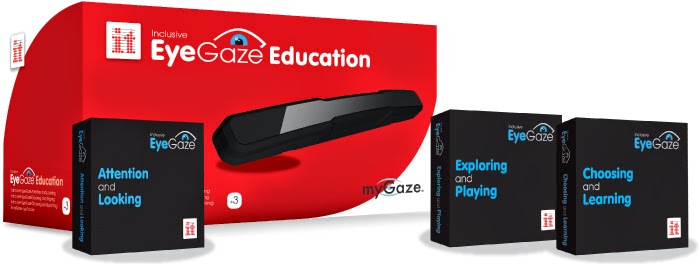
Inclusive EyeGaze Education
NEW Eye Gaze Education includes a huge 54 fun and meaningful activities to explore AND an easy to use eye tracker.
Includes
- 1x Attention & Looking (download)
- 1x Exploring & Playing (download)
- 1x Choosing & Learning (download)
- 1x myGaze Eye Tracker
Friday, 8 May 2015
Eye Gaze Software
The Attention and Looking software is designed to get the learner started with the Eye Gaze and learning the basics like cause and effect. There are 18 fun and meaningful activities for your child to get engaged with
http://www.helpkidzlearn.com/shop/eye-gaze-software/attention-and-looking?aref=JDYTCVFR
Exploring and Playing has 18 fun games and activities for your child to either play alone or with their friends. These will allow your child to engage with and explore thoroughly throughout.
http://www.helpkidzlearn.com/shop/eye-gaze-software/exploring-and-playing?aref=GVLMGLWJ
Choosing and Learning is our third software of the three and has 18 activities designed to prepare eye gaze users for further communication and learning activities by developing choice making and access skills.
http://www.helpkidzlearn.com/shop/eye-gaze-software/choosing-and-learning?aref=PANEABDT
http://www.helpkidzlearn.com/shop/eye-gaze-software/attention-and-looking?aref=JDYTCVFR
Exploring and Playing has 18 fun games and activities for your child to either play alone or with their friends. These will allow your child to engage with and explore thoroughly throughout.http://www.helpkidzlearn.com/shop/eye-gaze-software/exploring-and-playing?aref=GVLMGLWJ
Choosing and Learning is our third software of the three and has 18 activities designed to prepare eye gaze users for further communication and learning activities by developing choice making and access skills.
http://www.helpkidzlearn.com/shop/eye-gaze-software/choosing-and-learning?aref=PANEABDT
Tuesday, 5 May 2015
New Eye Gaze Software
New Eye Gaze Software Available Now
The HKL Shop just got a little bigger. We are pleased to announce that you can now purchase on HelpKidzLearn a wider selection of accessible software designed specifically for eye gaze students.
Eye Can Fly can also be accessed with one or two switches.
http://www.helpkidzlearn.com/shop/eye-gaze-software?aref=MQIPPWQU
Eye Can Fly can also be accessed with one or two switches.
http://www.helpkidzlearn.com/shop/eye-gaze-software?aref=MQIPPWQU
Tuesday, 14 April 2015
Register For Upcoming Live Webinars!
Free of charge, fully interactive, live training sessions online.
The iPad's touchscreen interface was designed to be accessed and used easily. However some users with physical disabilities struggle with the requirements of multi-finger tapping, swiped and other gestures. This in-depth session will take a look at facilities already built into the iPad which aid users with physical disabilities. These include assisted touch and switch access, the webinar will show you how to set them up and also what accessories, such as switch interfaces and styli, they can be used with.
ChooseIt! Maker 3 is the multi-award winning software resource for creating choice based activities on the computer, iPad or Android tablets. The session will entail using ChooseIt! Maker 3 to create personalised learning materials that will work with the eye gaze technology on the PC. Whether you are using a MyGaze, Tobii Communication device, PCEye Go, PCEye Explore or any other eye gaze system that can perform mouse emulation, this detailed session will show you how to create personalised resources from basic cause and effect through to simple choice making activities.
A large number of learners with SEN struggle with handwriting and producing correctly spelled, grammatically accurate written work, technology can provide the aid they need. This session with look at what tablets and computers can offer struggling learners, looking at supports such as text to speech, word prediction, word banks and speech to text and how they can make recording and accessing text easier.
In recent years, there has been a dramatic rise in popularity for the electronic book. This has opened up a new opportunity for those who struggle with accessing printed text. Computers and tablets can provide a wide range of supports to make these books more accessible for those with special needs. This session will show you how to obtain or create electronic texts and how supports, such as text to speech and text leveling, can provide access.
Register now - there are limited spaces available!
http://www.helpkidzlearn.com/events/webinars?aref=NMPLQMEG
Subscribe to:
Posts (Atom)